
VRMify Enhanced
VRMify Enhanced · 增强版 — upstream VRMify plus fixes for solid-colour toon materials, animal-ear spring bones, Unity outlines, UV seam white edges, and a non-forced T-pose.
Turn MMD / PMX models — and FBX, unitypackage, Unreal and XNALara models — into VRM avatars.
Drop in a file or a whole archive, preview the result, done. No Blender, no Unity, no plugins.




English | 简体中文
## Highlights
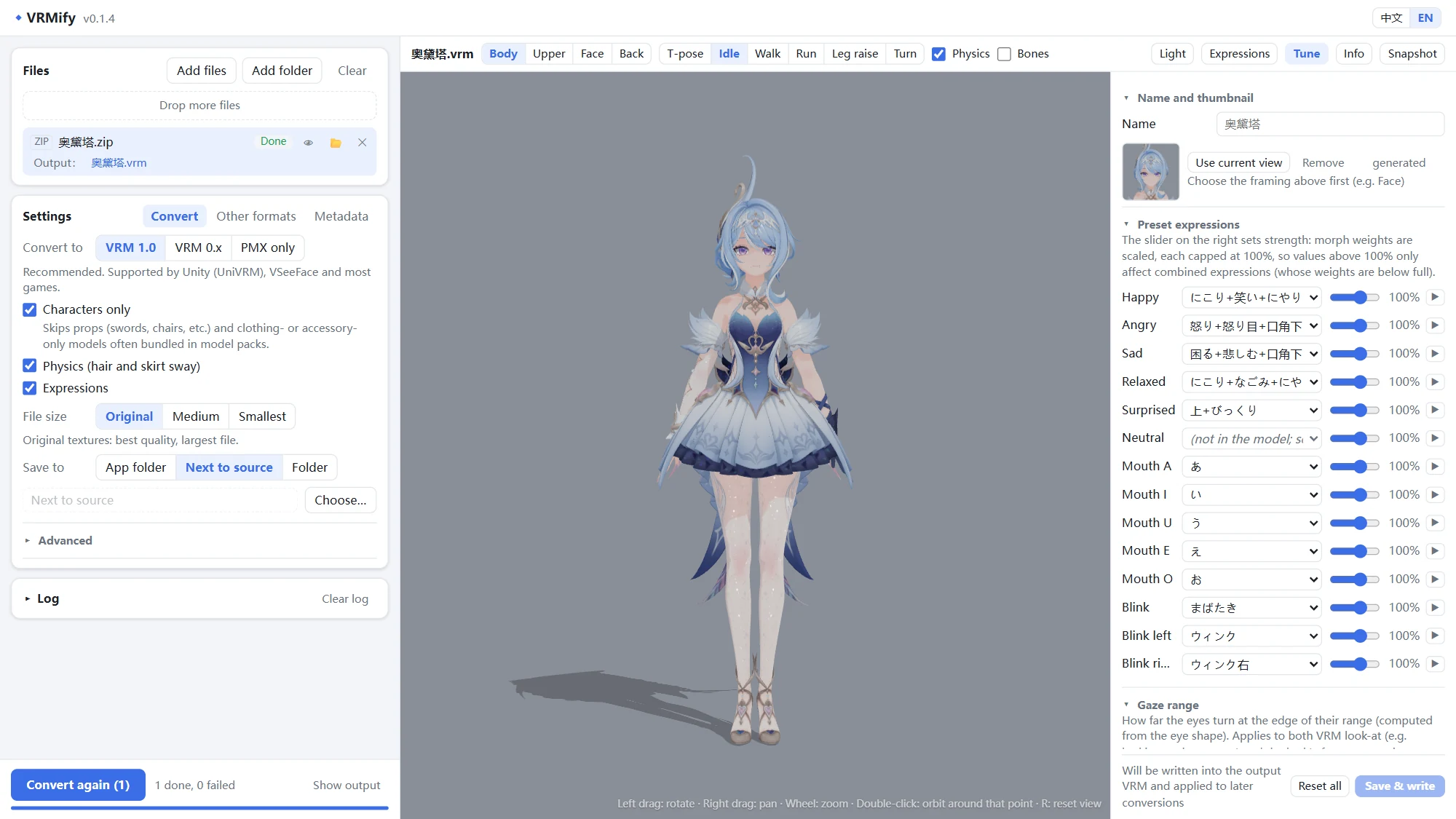
- **One window, nothing to install.** A portable exe for Windows. The converter itself is plain Python, so there
is no Blender, Unity or add-on chain to set up.
- **Looks right out of the box.** MToon toon shading built from the PMX toon textures, transparency decided per
texture, optional T-pose conversion (off by default — the original rest pose is preserved unless you opt in),
and VRoid-style emotion presets that move brows, eyes and mouth together.
- **Physics that moves like a native VRM.** PMX rigid bodies become VRM 1.0 SpringBone chains and colliders, with
special care for skirts. Models without physics get hair, skirt and ribbon chains from their bone names.
- **A clean skeleton.** MMD, VRChat, Mixamo and Unity bone names map to the VRM humanoid; append (付与) bones, IK,
tip and control bones that do nothing in VRM are merged or removed, leaving a VRoid-like hierarchy.
- **Feed it what model sites hand out.** Drop a zip, 7z or rar as is: models are found inside, props and
outfit-only models are skipped, and garbled Japanese / Chinese file names in old zip files are restored.
- **See it before you use it.** A three-vrm preview (the same rules as UniVRM) with walk / run motions, expressions,
and skeleton and collider overlays. Fix presets, physics, the gaze range or the thumbnail without converting again.
- **Valid output.** Output passes the official VRM JSON Schema and avoids the data that makes UniVRM imports
fail.
## Screenshots
 |
 |
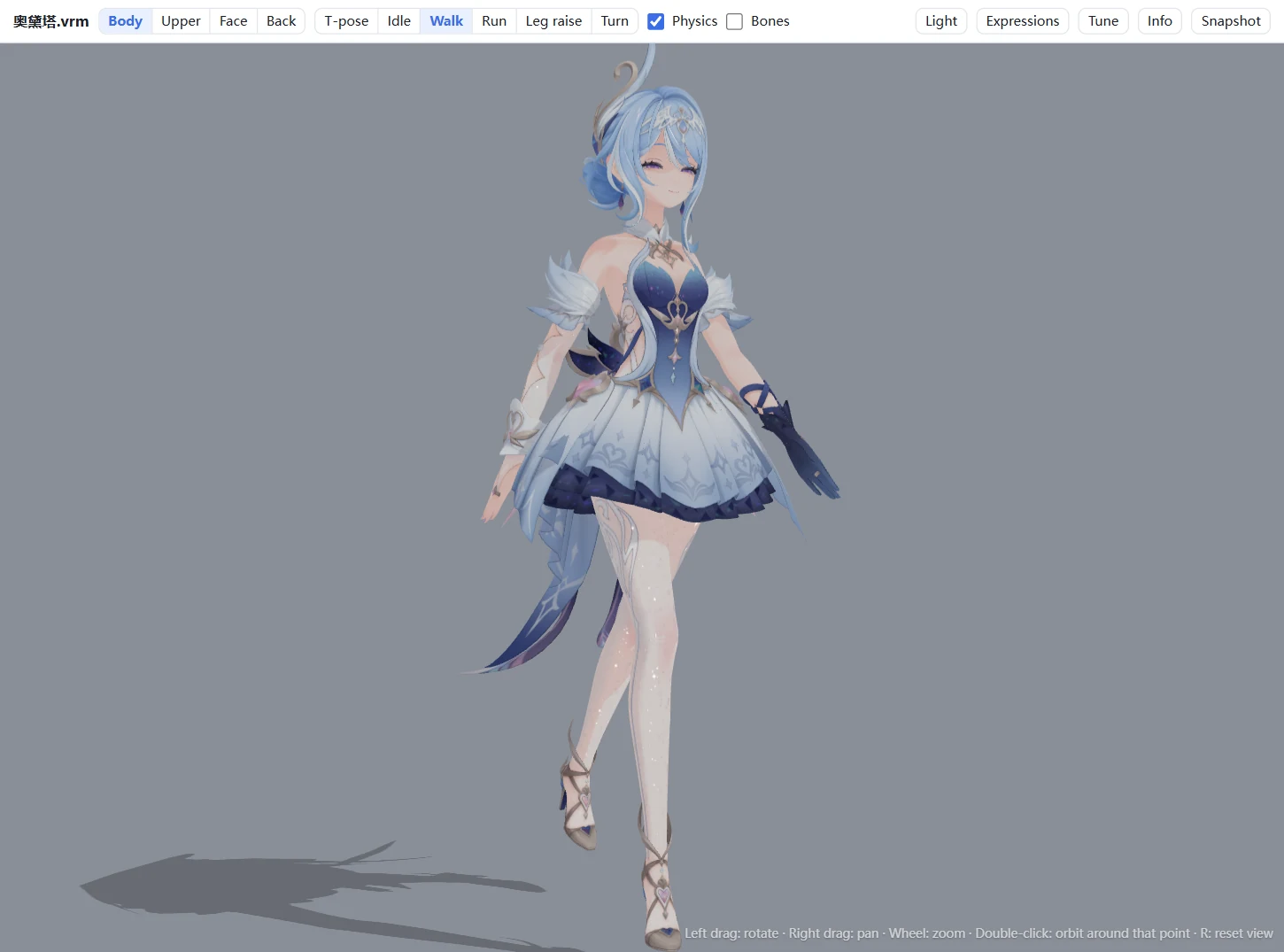
| Preview: idle, walk and run motions, lighting, expressions |
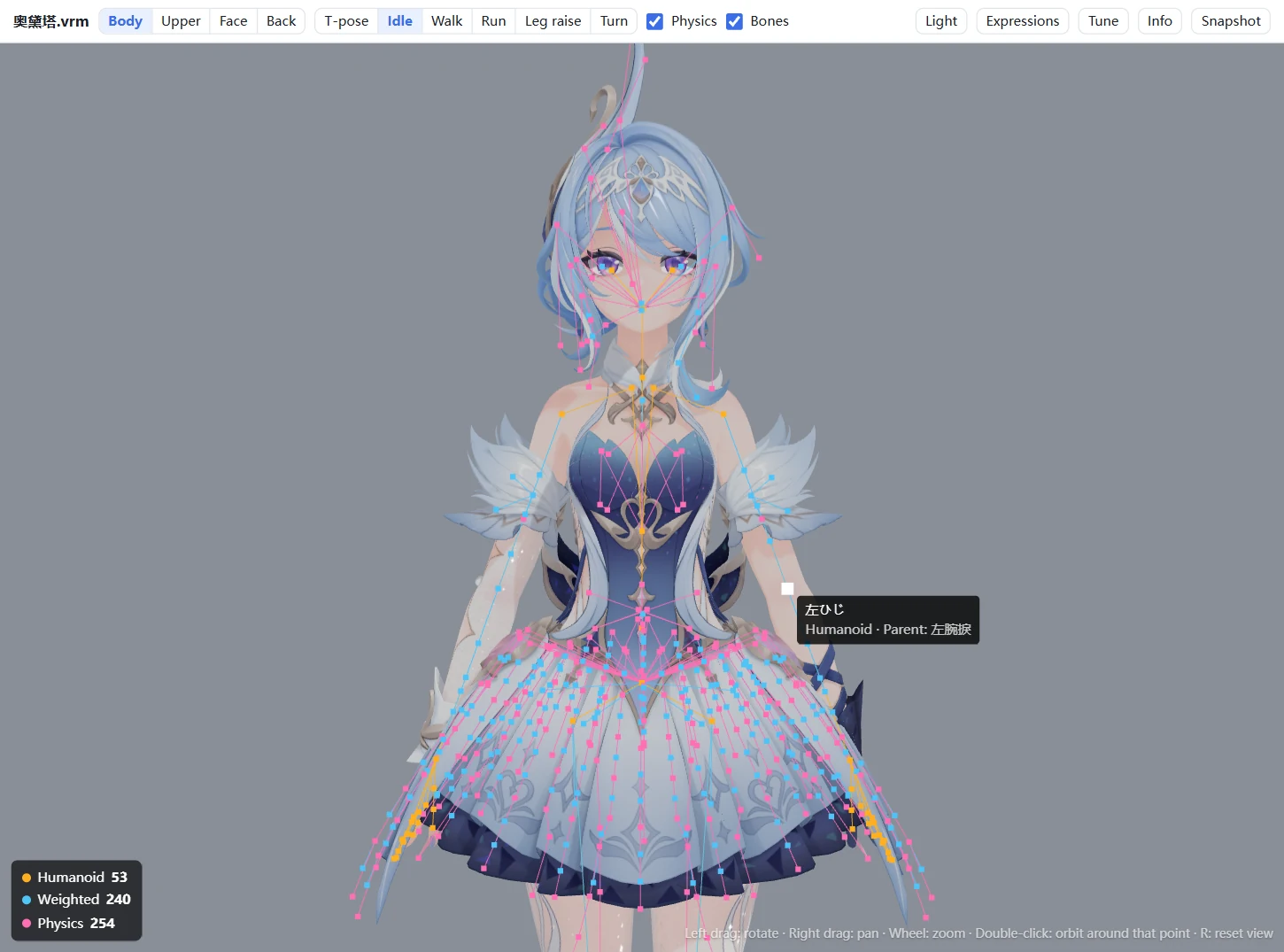
Skeleton overlay: humanoid, weighted and physics bones; name and parent on hover |
|
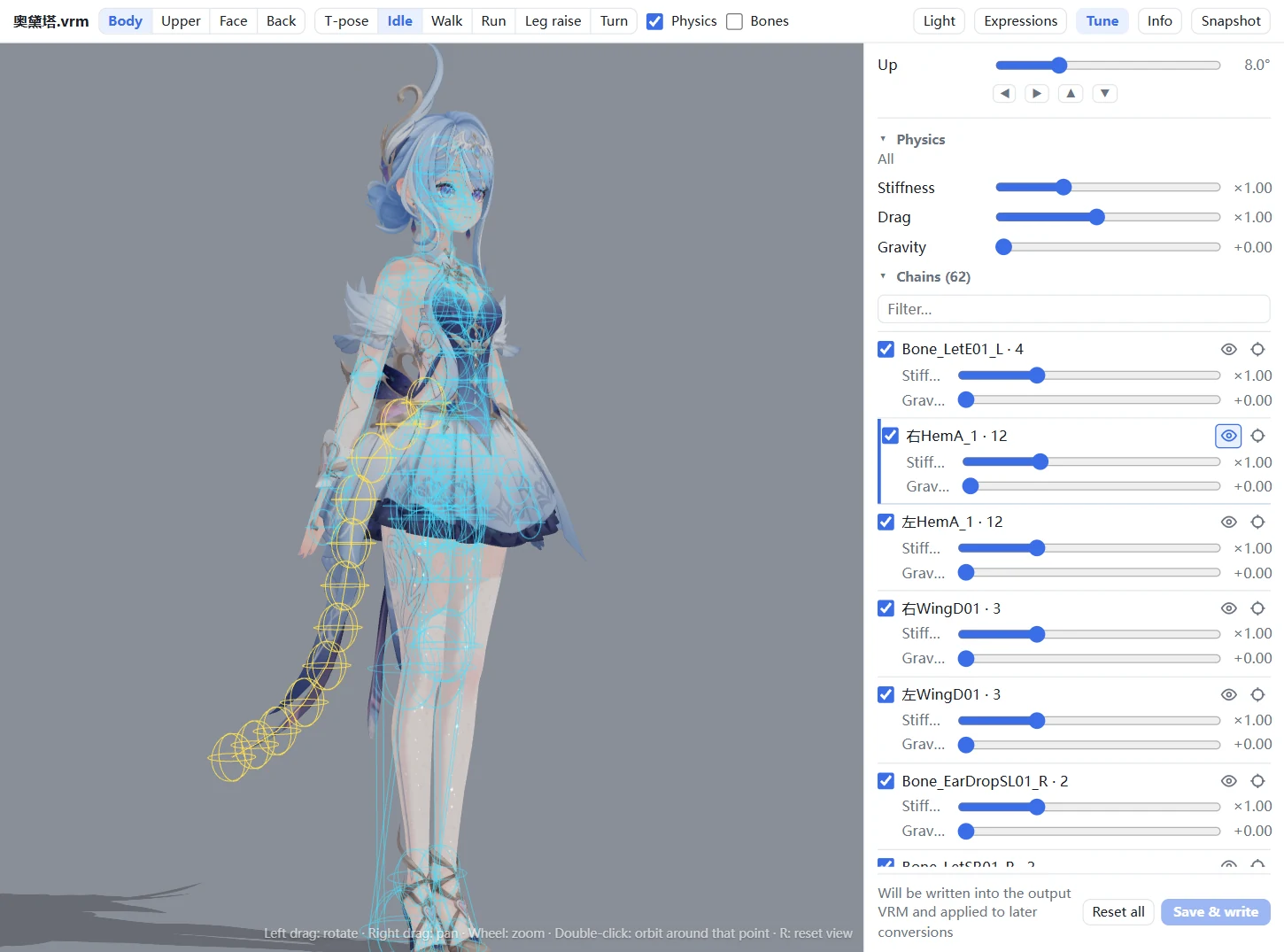
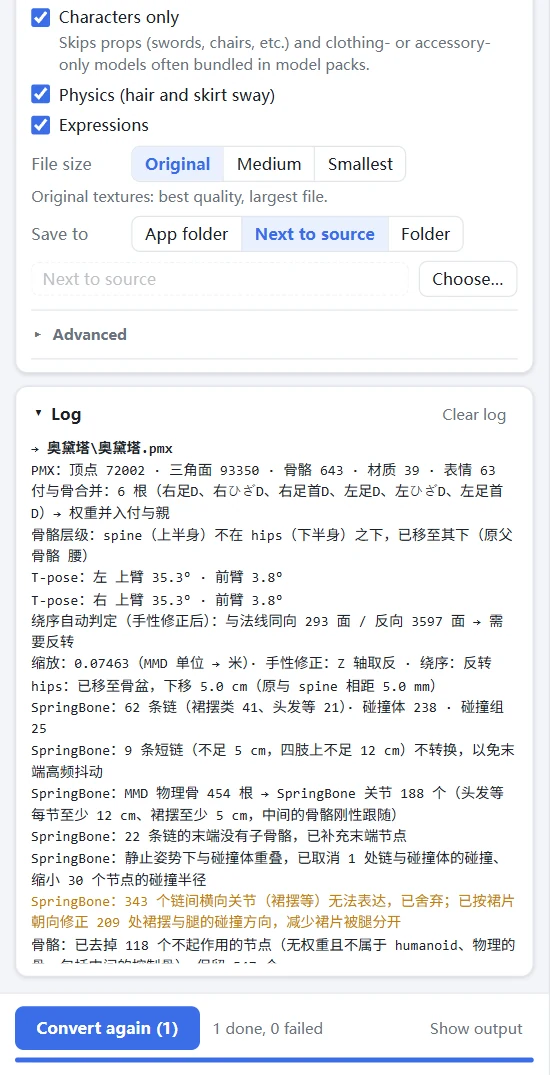
| Tune: presets, gaze and physics per chain, with the chain and its colliders shown ·
Log: what was converted, merged or skipped |
Model in the screenshots: 奥黛塔 (provided by miHoYo, edited by 观海), shown under its terms of use.
## Quick start
1. Download `VRMify-v-win64.zip` from [Releases](https://github.com/JiGuang283/VRMify/releases/latest),
unzip it and run `VRMify.exe`.
2. Drag model files, folders or archives into the window and click **Start conversion**.
3. Click the eye icon next to a file to preview the VRM; adjust it in **Tune** if needed.
> [!NOTE]
> The exe isn't code-signed, so Windows may show "Windows protected your PC" the first time: click **More info →
> Run anyway**. The window uses the system WebView2 (built into Windows 11 and almost every Windows 10); without it
> the UI opens in your browser, says why at the top, and still takes dropped or added files (they are copied first).
> The interface and the conversion log are in English or Chinese (switch at the top
> right); the first start follows the system language.
## Supported formats
| Input | |
|---|---|
| **PMX** (MMD) | the main path: skeleton, materials, morphs and physics are all converted |
| **FBX**, **unitypackage** | Unity / VRChat-style models; facing and texture alpha are detected |
| **uemodel** (UEFormat), **psk / pskx** (Unreal ActorX) | Unreal models; uemodel parts can be aligned to a full-body reference |
| **xps** (XNALara) | |
| **zip / 7z / rar** | models inside are found and converted; 7z / rar use 7-Zip, WinRAR, Bandizip or Windows' `tar` |
| **VRM** | opens in the preview and the Tune panel |
Output: **VRM 1.0** or **VRM 0.x** (both with SpringBone physics), or **PMX** only.
## What the conversion does
Skeleton
- MMD standard bone names (and common English, VRChat, Mixamo and Unity names) map to the VRM humanoid; missing
required bones get placeholders so the hierarchy stays valid.
- Append (付与) bones such as 足D are merged into the bones they follow, together with their weights; helper
bones that follow a joint partly (knee or elbow helpers) share their weights with the joint.
- The log warns when part of the mesh would not follow the joint it follows in MMD, or when a humanoid bone sits
clearly in the wrong place.
- Bones that move nothing in VRM — IK, tip bones, operation centres — are removed. With "Remove control bones"
(on by default) unweighted intermediate bones such as センター or グルーブ go too, so the hierarchy is
Root > Hips. Skinning and motion are unchanged.
- Optional T-pose conversion, **off by default**: the model's original rest pose is kept. Enable "Convert to
T-pose" (or pass `--tpose`) if you want A-pose arms raised, palms down, fingers straight, thumbs 45° forward;
hips are moved to the pelvis.
Materials
- MToon shading: shadow colour and the light/shadow boundary come from the PMX toon textures.
- Opaque, cutout or transparent is decided from the textures themselves; materials get unique names.
- Optional texture slimming (smaller size, JPEG for opaque textures) often halves the file.
Expressions
- Blink and the vowels (aa / ih / ou / ee / oh) map from MMD, VRoid, VRChat, ARKit and common Chinese names.
- Emotion presets (happy, angry, sad, relaxed, surprised) combine brow, eye and mouth morphs like VRoid.
- Material, bone and UV morphs are converted; gaze expressions are added from the eye bones.
- `hideHighlight` (eye highlights off) and `tongue` are added under fixed names — from the model's own morphs, or
generated from the eye highlight materials.
Physics
- PMX rigid bodies and joints become VRM 1.0 SpringBone chains, colliders and collider groups.
- Skirt chains get colliders placed so the skirt is pushed as one piece instead of splitting; very short chains on
arms and legs follow the bone rigidly instead of jittering.
- Models without rigid bodies (FBX and others) get chains for hair, skirts, sleeves, ribbons and tails from their bone
names.
Details and all options: [PMX → VRM](docs/pmx-to-vrm.md), [Other formats → PMX](docs/other-formats.md)
(in Chinese).
## Using the app
**Settings** sit in three tabs: **Convert** (target, characters only, physics, expressions, file size, where to
save; more under *Advanced*), **Other formats** (FBX / uemodel / psk / xps options) and **Metadata** (author,
version and license written into every VRM; defaults to the most restrictive terms).
**Preview controls**
| | |
|---|---|
| Left drag / right drag / wheel | rotate / pan / zoom toward the pointer |
| Double-click the model | orbit around that point |
| `R` or `Home`, or double-click the background | back to the selected framing |
| **Bones** switch | skeleton overlay; hover a bone for its name and parent |
**Tune** changes a converted model without converting again: name and thumbnail, which morph each preset uses and
how strong, the gaze range, and physics stiffness and gravity overall or per chain. Hover a chain to see it with
the colliders it hits; pin it or point the camera at it. Changes are written into the VRM and reapplied the next
time the file converts.
A face thumbnail is captured automatically after each conversion (can be turned off; a thumbnail you set yourself
is kept).
## Command line
```bash
python convert/pmx2vrm.py "model.pmx" -o "model.vrm" # VRM 1.0
python convert/pmx2vrm.py "model.pmx" --spec 0x # VRM 0.x
python convert/fbx2pmx.py "model.fbx" -o "model.pmx" # other formats → PMX, then VRM
python tools/qa/check_vrm.py "model.vrm" # validate a VRM (structure + official schema)
```
## FAQ
Unity or a game hangs while importing
Usually UniVRM hit invalid data. Check the file with `python tools/qa/check_vrm.py file.vrm`. A Unity app's log at
`%USERPROFILE%\AppData\LocalLow\\\Player.log` names the exception.
The model is white or some parts have no texture
Textures have to be next to the model, where the PMX expects them: add the whole model folder or the archive, not
just the .pmx. A texture that sits in another subfolder of the model folder is found by its name; the conversion log
lists any that are still missing or can't be read.
The face looks flat or has no shadows
Faces on native VRM models such as VRoid are mostly flat too; shading comes from cast shadows (hair and so on).
Shadow colour comes from the PMX toon textures. Check it with the preview's lighting angle and shadow switch.
Hair or skirts jitter or clip
SpringBone is an approximation of MMD physics. Adjust stiffness and gravity overall or per chain in Tune; hover a
chain to see which colliders it uses.
Holes, black edges or missing hair sheets
Turn on "All materials double-sided" under *Advanced* on the Convert tab. Outline shells (an inverted copy around the
face or body) and the inner sides of clothes stay single-sided, otherwise they would cover the model; the log lists
them. The conversion log also shows how the triangle winding was decided.
An FBX faces away or its transparency is wrong
Turn on "Extra 180° turn" or try another "Texture alpha" mode on the Other formats tab.
## Known limitations
- VRM 0.x physics is approximated from the 1.0 result: one set of parameters and one hit radius per chain, and
sphere colliders only.
- PMX joints between neighbouring skirt chains have no SpringBone equivalent, so skirts move less as one piece than
in MMD.
- Multiply sphere maps and the shared toon07–10 textures have no MToon equivalent; PMX outlines are off by
default, but outlines configured in Unity materials (`_Outline_Width` / `_Outline_Color`) are kept.
- Expression presets are matched by name; unusual names need presets assigned in Tune.
- XPS models have no morphs.
## Running from source
Python 3.10 or newer.
```bash
python -m venv .venv
.venv\Scripts\pip install -r requirements.txt # optional: pywebview (own window), Pillow (faster textures)
python ui/app.py # or double-click VRMify.bat; --browser opens it in the browser
```
Without the optional packages conversion still works; the UI opens in the browser and texture slimming is
unavailable.
Project layout and development
```
convert/ converters: pmx2vrm.py (PMX → VRM) and its stages in vrmconv/, fbx2pmx / uemodel2pmx / psk2pmx /
xps2pmx, pipeline.py (the app's conversion flow), vrm_edit.py (Tune)
formats/ file formats: pmxio, vrmio (GLB), fbx_reader, uemodelio, pskio, xpsio, archive
ui/ desktop app: app.py (entry), server.py (backend), web/ (pages), viewer/ (three-vrm preview)
tests/ unit tests on small generated models (synth.py)
tools/ batch conversion, VRM checks, physics tests, regression on real models, release build
docs/ conversion notes
```
```bash
pip install -r requirements-dev.txt # jsonschema, pyinstaller, …
python -m unittest discover -s tests # unit tests
python tools/regress.py record # record results on your own models (kept out of the repo)
python tools/regress.py check # re-convert and compare after a change
python tools/build_release.py # → dist/VRMify-v-win64.zip
```
Releases: bump `ui/version.py`, commit, push a `v` tag; GitHub Actions tests, builds, smoke-tests the exe
and drafts the release.
## Contributing
Bug reports and pull requests are welcome. When reporting a conversion problem, include the conversion log and
describe the model (where it comes from, which format) — please don't attach model files you aren't allowed to
share. Run the unit tests before opening a pull request.
## License
- VRMify Enhanced is licensed under [GPL-3.0](LICENSE). Based on [SaraKale/Model-To-PMX](https://github.com/SaraKale/Model-To-PMX).
- The preview uses [three.js](https://threejs.org/) and [three-vrm](https://github.com/pixiv/three-vrm) (MIT) and
ammo.js (zlib); see `ui/viewer/vendor/`.
- **Make sure you're allowed to use a model before converting it.** Many MMD models forbid redistribution or
modification, and the converted VRM is bound by the same terms.